 ScreenBadger
Records the tab, not your desktop
Capture just the tab you’re working in, at 30 or 60 fps for up to 60 minutes, without notifications or other windows getting in the way. Need more? Switch to Entire screen.
Screen recording in Chrome
ScreenBadger is a Chrome extension that records a browser tab or your entire screen, opens it in a built-in editor, and exports a finished MP4 or GIF. No desktop app to install, and no account needed to start.
Free forever · No credit card · Works in Chrome, Edge, Brave, Arc, and Opera
The problem
When the thing you want to show is a web app, a desktop recorder means extra software, a cluttered full screen, and a separate editor. You end up spending longer cleaning up the video than recording it.
Why ScreenBadger
Capture just the tab you’re working in, at 30 or 60 fps for up to 60 minutes, without notifications or other windows getting in the way. Need more? Switch to Entire screen.
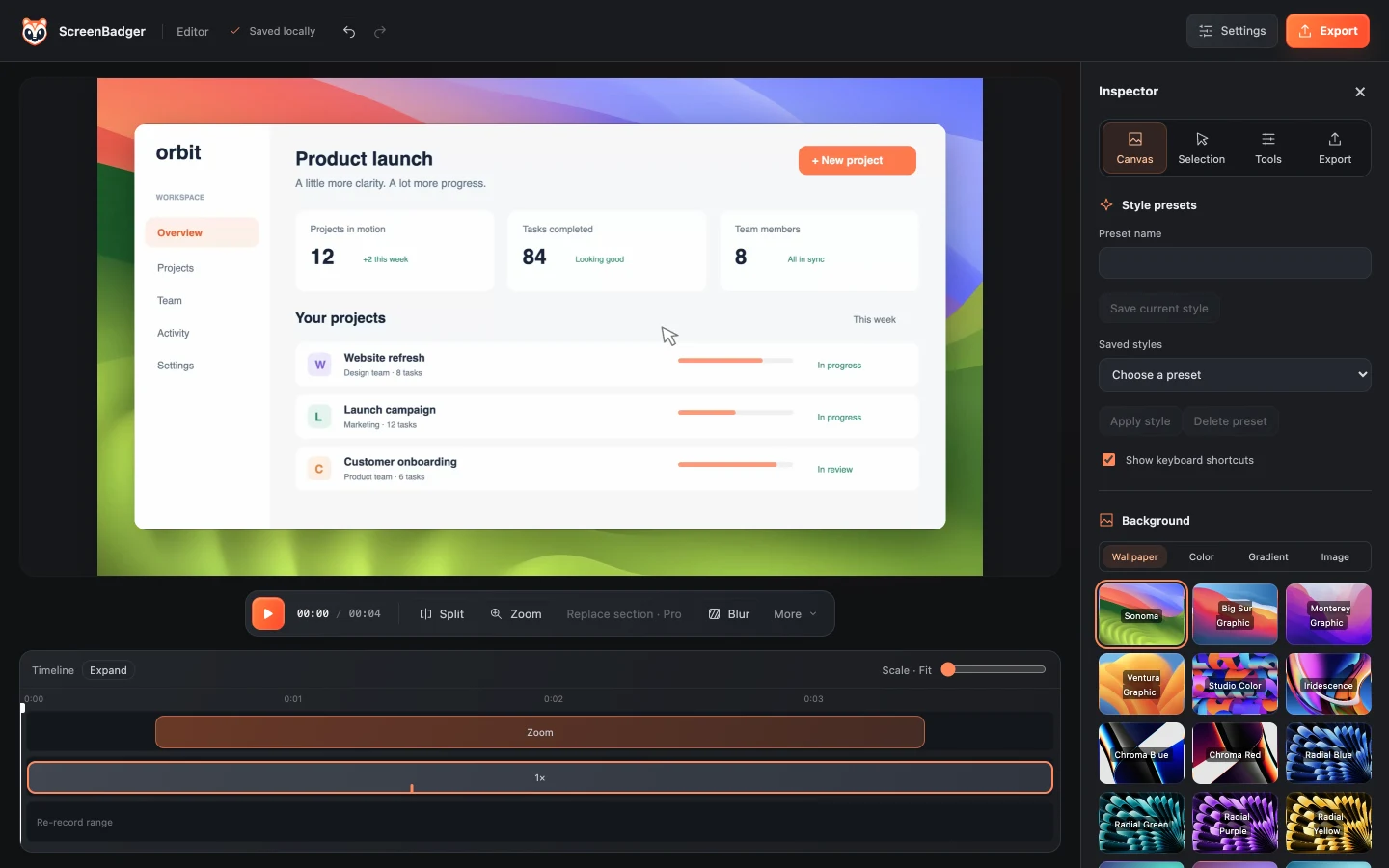
ScreenBadger turns clicks into smooth camera moves you can edit, so viewers always see the part of the page that matters.
Recordings and edits are saved in your browser profile. Nothing is uploaded unless you choose to share a finished video or screenshot with Cloud.
How it works
Install the extension from the Chrome Web Store and pin it to your toolbar.
Open the popup, choose This tab, turn on camera, microphone, or tab sound, and press Start recording.
Trim the ends, review the automatic zooms, and blur anything private.
Download an MP4 or a GIF of up to 30 seconds, rendered on your device.
FAQ
Yes. Recording and editing are free, with unlimited watermark-free MP4 exports up to 720p and GIF export. Higher-resolution MP4s are watermarked on Free.
It works in Chromium browsers that support Chrome extensions, including Microsoft Edge and Brave. Firefox and Safari aren’t supported.
Yes. You can record the tab’s audio, your microphone, or both, and add your camera as a separate overlay.
No. You can record, edit, and export on Free without signing in. An account is only needed to restore Pro Lifetime or use Cloud.
Related
Record a browser tab or your entire screen for up to 60 minutes with tab sound, your microphone, and your camera.
Learn moreTrim, split, speed up, caption, and style your recordings, then export MP4 or GIF.
Learn moreUnlimited free tab recordings up to 60 minutes, with an editor built in.
Learn moreSee a live input level and record a quick clip to hear how you sound.
Learn moreRecord, edit, and export in your browser. Free forever, no credit card required.