 ScreenBadger
Screen recorder for Chrome
Record a tab or your screen.
Keep every detail.
ScreenBadger records a Chrome tab or your entire screen at 30 or 60 fps for up to 60 minutes, with tab sound, your microphone, and your camera. Every take is saved in your browser and opens straight in the editor.
Free forever · No credit card · Works in Chrome, Edge, Brave, Arc, and Opera
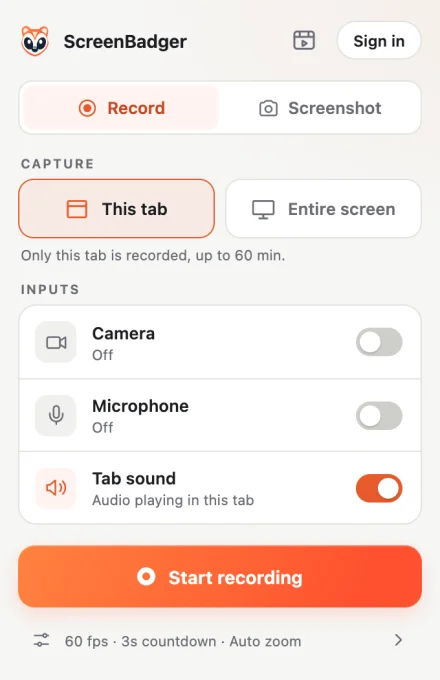
Tab or screen
Start a recording in two clicks.
Open the extension, pick This tab or Entire screen, and press Start recording. A short countdown gives you a moment to get ready, then Pause, Resume, and Stop are one click away. Paused time is left out of the video.
- Up to 60 minutes per recording
- 30 or 60 fps, with an optional 3, 5, or 10 second countdown
- Entire screen also records other windows, up to 1080p
Audio
Capture the tab and your voice.
Record the sound playing in the tab, your microphone, or both. While you record, the popup shows a live microphone level and warns you if it hears nothing, so you don’t lose a take to a muted mic.
- Tab sound and microphone, separately toggled
- Live microphone meter
- Silent-microphone warning
Camera
Add your face without locking it in.
Your camera is recorded as its own video, up to 720p at 30 fps. In the editor you can move it to any corner, resize it, round it into a circle, mirror it, or hide it.
- Picture-in-picture preview while recording
- Editable position, size, and shape
- Shrinks during zooms, then returns
Editable cursor
A cursor you can restyle later.
In tab recordings the cursor isn’t baked into the video. ScreenBadger records its position separately, so you can change its size and style and add click effects after recording. Turn on Native cursor in Recording settings when you need the real one.
- Arrow or dot cursor styles
- Adjustable cursor size
- Gentle smoothing that keeps clicks accurate
Saved locally
Your recordings stay in your browser.
Recordings are written to your browser profile as you go, with no account or upload required. If the browser closes mid-recording, the library offers to recover what was saved.
- No account needed to record
- Recovery after an interrupted session
- Search, rename, and delete takes in the library
FAQ
Questions about screen recorder
Is the screen recorder free?
Yes. Recording, editing, and unlimited watermark-free MP4 exports up to 720p are free. Higher-resolution MP4 exports carry a small watermark unless you have Pro Lifetime.
How long can a recording be?
Each recording can run for up to 60 minutes. Recording stops automatically at the limit and the take is saved to your library.
Can I record my entire screen?
Yes. Choose Entire screen in the popup to record a whole display, including other windows and notifications, at up to 1080p. Automatic zooms, privacy masks, and click effects need a tab recording, so add zooms and blurs by hand for screen recordings.
Which browsers does it work in?
ScreenBadger works in Google Chrome and other Chromium browsers that support Chrome extensions, such as Microsoft Edge and Brave. It does not run in Firefox or Safari.
Why does Chrome show a debugging banner while I record?
ScreenBadger uses Chrome’s debugger permission to capture page pixels without baking in the cursor, which is what makes the cursor editable. Chrome shows that banner whenever this capture mode is active. To keep DevTools open, turn on Native cursor in Recording settings.
Are my recordings uploaded anywhere?
No. Recordings and edits stay in your browser profile. Nothing leaves your device unless you choose to share a finished MP4 or screenshot with Cloud.
Related
Also included
Auto zoom
Clicks become smooth, editable camera moves you can adjust on the timeline.
Learn moreWebcam test
Check your camera’s live preview, resolution and frame rate.
Learn moreMicrophone test
See a live input level and record a quick clip to hear how you sound.
Learn moreChrome screen recorder
Record, edit, and export tab recordings without leaving Chrome.
Learn moreMake your next screen recording worth sharing.
Record, edit, and export in your browser. Free forever, no credit card required.