 ScreenBadger
Browser-based video editor
Edit the recording.
Not your whole afternoon.
Every recording opens in a timeline editor built for screen videos. Cut the slow parts, explain each step with captions and callouts, give it your own look, and export without leaving your browser.
Free forever · No credit card · Works in Chrome, Edge, Brave, Arc, and Opera
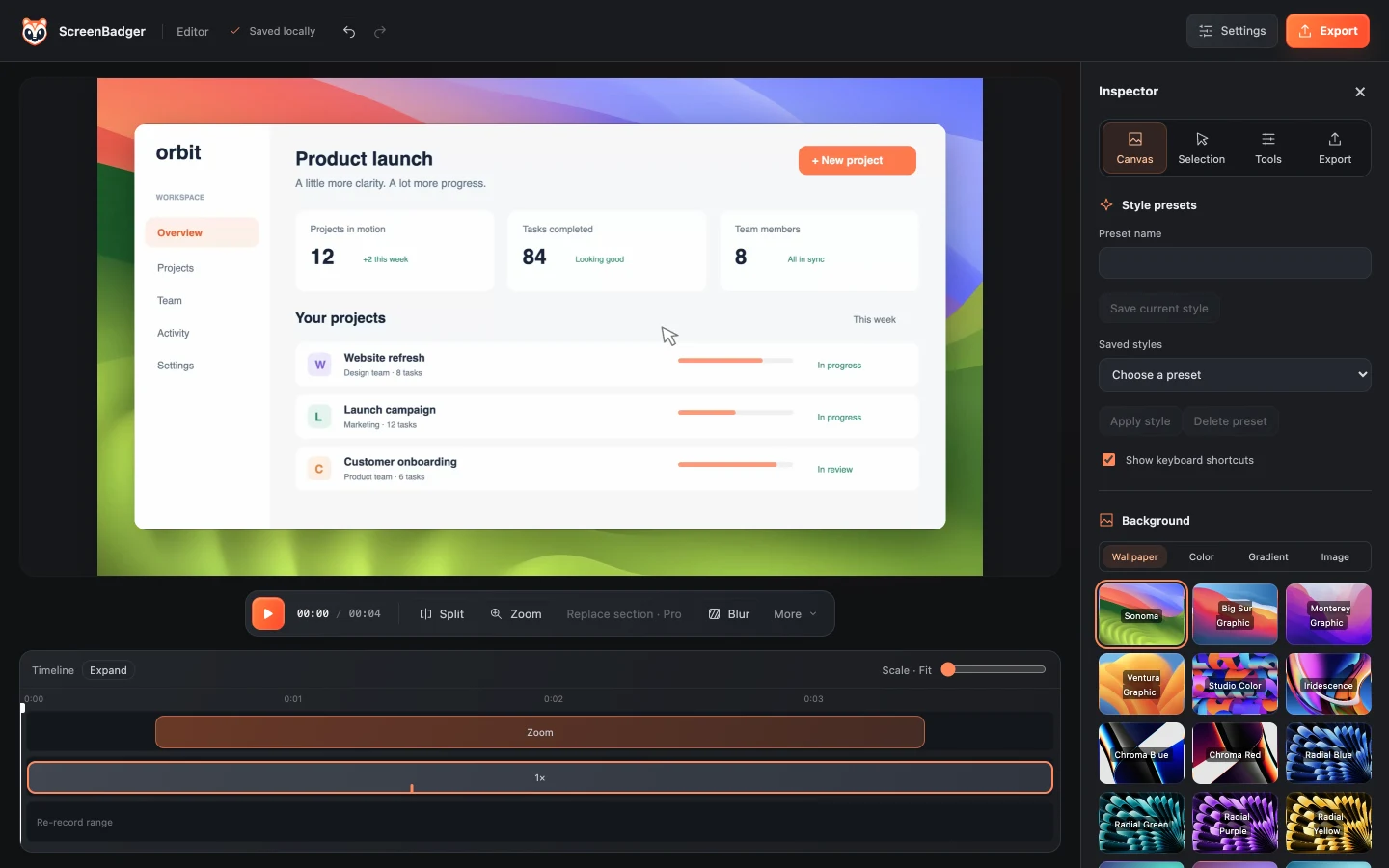
Timeline editing
Cut the slow parts.
Drag trim handles, split at the playhead, delete what you don’t need, and undo anything. Change the speed of a section from 0.5× to 4×, with audio pitch preserved.
- Trim, split, and delete
- Section speed from 0.5× to 4×
- Undo and redo for every edit
Find dead time
Spot the pauses for you.
Find dead time looks at your clicks, typing, and audio to suggest inactive stretches. For each one you choose to remove it, speed it up, or ignore it, so nothing changes without your say.
- Remove, speed up, or ignore
- Based on interaction and audio activity
Captions and callouts
Explain every step.
Write captions or import SRT and VTT files, edit the transcript, and cut a passage straight from it. Add timed text, arrows, boxes, numbered badges, and spotlights that follow your edits.
- Manual captions plus SRT/VTT import and export
- Burned-in subtitle styling
- Timed arrows, badges, and spotlights
Canvas and style
Make it look like yours.
Choose a solid color, gradient, wallpaper, or your own image as the background, then set padding, frame, cursor, and click effects. Save the look as a preset to reuse on your next video.
- Backgrounds, padding, and corner radius
- Cursor style and click effects
- Reusable style presets
Chapters and guides
Turn a video into a step guide.
Automatic chapters come from your zooms. Export their timestamps as text, or as a standalone HTML step guide with an image for each step.
- Chapter timestamps as text
- HTML step guide with rendered images
Export
Export for wherever it’s going.
Pick a destination preset for YouTube, X, LinkedIn, Shorts, Reels, TikTok, or custom website sizes, and keep a separate portrait layout. MP4 and GIF are rendered on your device.
- MP4 up to 4K
- GIF up to 30 seconds
- Landscape, square, and portrait presets
FAQ
Questions about video editor
Does the editor add a watermark?
Free exports are watermark-free up to 720p. 1080p and 4K exports on Free include a small “Made with ScreenBadger” watermark. Pro Lifetime removes it through 4K.
Does ScreenBadger generate captions automatically?
No. Automatic captions aren’t available. You can write captions in the editor or import SRT and VTT files, and both are free.
Can I edit videos I didn’t record with ScreenBadger?
No. The editor works on recordings made with the extension, because it relies on the cursor, click, and interaction data captured alongside the video.
Is my project uploaded while I edit?
No. Projects and edits are saved in your browser profile, and MP4 and GIF exports are rendered locally.
Can I fix a mistake without re-recording everything?
Yes, with Pro Lifetime. Select a range on the timeline, record a new take, and ScreenBadger replaces just that section and updates the zooms.
Related
Also included
Auto zoom
Clicks become smooth, editable camera moves you can adjust on the timeline.
Learn moreTutorial video maker
Record clear how-to videos with zooms, captions, callouts, and an optional step guide.
Learn moreVideo frame extractor
Step through a video frame by frame and save any frame as a PNG.
Learn moreScreen Studio alternative
Auto zoom and polished demos in the browser, on any computer that runs Chrome.
Learn moreMake your next screen recording worth sharing.
Record, edit, and export in your browser. Free forever, no credit card required.